Atari - Lynx (Gearlynx)
Background
Gearlynx is an open source, cross-platform Atari Lynx emulator written in C++.
- Very accurate emulation supporting the entire commercial Atari Lynx catalog.
- Bank switching (BANK1 + AUDIN) and EEPROM support.
- Save files (EEPROM, NVRAM and persistent cartridge RAM).
- GameDrive and ElCheapoSD cartridge support.
- ComLynx link cable support with two to four systems, independent controllers, configurable screens and audio, and multi-ROM subsystem loading.
- Configurable low-pass audio filter.
- Internal database for automatic ROM detection and hardware selection when
Autois selected. - Supported platforms (libretro): Windows, Linux, macOS, Raspberry Pi, Android, iOS, tvOS, webOS, PlayStation Vita, PlayStation 3, Nintendo 3DS, Nintendo GameCube, Nintendo Wii, Nintendo WiiU, Nintendo Switch, Emscripten, Classic Mini systems (NES, SNES, C64, ...), OpenDingux, RetroFW and QNX.
The Gearlynx core has been authored by:
The Gearlynx core is licensed under:
A summary of the licenses behind RetroArch and its cores can be found here.
BIOS
Gearlynx requires a BIOS to work.
Required firmware files go in the frontend's system directory.
Attention
The Lynx boot ROM file is required for Gearlynx to function.
| Filename | Description | Size | md5sum |
|---|---|---|---|
| lynxboot.img | Lynx Boot Image - Required | 512 bytes | fcd403db69f54290b51035d82f835e7b |
The checksum above identifies the recommended original BIOS. Other 512-byte BIOS images can also be loaded.
Extensions
Content that can be loaded by the Gearlynx core have the following file extensions:
- .lnx
- .lyx
- .o
- .bin
Supported formats include LNX and LNX2 cartridge headers, headerless cartridge images and BS93 homebrew executables. LNX2 images use the .lnx extension.
RetroArch database(s) that are associated with the Gearlynx core:
Features
Frontend-level settings or features that the Gearlynx core respects.
| Feature | Supported |
|---|---|
| Restart | ✔ |
| Screenshots | ✔ |
| Saves | ✔ |
| States | ✔ |
| Rewind | ✔ |
| Run-Ahead | ✔ |
| Netplay | ✔ |
| Core Options | ✔ |
| Memory Monitoring (achievements) | ✔ |
| RetroArch Cheats | ✔ |
| Native Cheats | ✕ |
| Controls | ✔ |
| Remapping | ✔ |
| Multi-Mouse | ✕ |
| Rumble | ✕ |
| Sensors | ✕ |
| Camera | ✕ |
| Location | ✕ |
| Subsystem | ✔ |
| Softpatching | ✔ |
| Disk Control | ✕ |
| Username | ✕ |
| Language | ✕ |
| Crop Overscan | ✕ |
| LEDs | ✕ |
Achievements are supported in single-player mode and disabled in linked sessions. Save states, and therefore rewind, run-ahead and netplay, are also unavailable in linked sessions.
Directories
The Gearlynx core's library name is 'Gearlynx'.
The Gearlynx core saves/loads to/from these directories.
Frontend's Save directory
| File | Description |
|---|---|
| *.srm | EEPROM, NVRAM or LNX2 persistent cartridge RAM save |
| *.srm2, *.srm3, *.srm4 | Screen 2, 3 and 4 saves in linked mode |
Frontend's State directory
| File | Description |
|---|---|
| *.state# | State |
Geometry and timing
- The Gearlynx core reports a dynamic refresh rate based on each game's timer configuration
- The Gearlynx core's provided sample rate is 44100 Hz
- The Gearlynx core's base size is 160x102 in horizontal mode and 102x160 in vertical mode
- The Gearlynx core's max width is 160
- The Gearlynx core's max height is 160
- The Gearlynx core uses square pixels by default, including in vertical mode; the 'Aspect Ratio' core option can override this
- Linked mode places the screens side by side, stacked, or in a two-column grid. Each cell uses the largest screen size among the linked systems: for example, two horizontal screens side by side use 320x102 and four screens in a grid use 320x204. Selecting a single screen uses that system's size
- Linked mode's max width and height are 640
- In linked mode, fixed DAR settings apply to each screen and 1:1 PAR keeps square pixels across the whole layout
SD cartridges
GameDrive and ElCheapoSD use the loaded ROM's directory as the emulated SD card root. Place the files required by the cartridge in that directory and select the appropriate Cartridge Hardware option if automatic detection does not identify it.
SD cartridge access requires a frontend with VFS version 3 support and a content path that identifies the ROM directory. Write operations also require frontend write support and permission to write to the content directory. SD writes update files in that directory; these files are separate from the frontend-managed EEPROM, NVRAM or persistent cartridge RAM .srm save.
ComLynx Link Cable
Enable ComLynx Link Cable Enable (restart), select the number of systems with Link Players (restart), choose Close Content, then load the ROM again to run independent copies of the same ROM. Controller ports 1 to 4 control the corresponding screens. All linked systems continue running when only one screen is displayed. RetroArch's Restart action resets every linked system. It does not apply changes to ComLynx Link Cable Enable or Link Players; changing these options requires Close Content followed by loading the ROM again.
To link different ROMs, load the 2 Player Lynx Link (lynx_link_2p), 3 Player Lynx Link (lynx_link_3p) or 4 Player Lynx Link (lynx_link_4p) subsystem and select a ROM for each screen. Selecting a subsystem enables linked mode regardless of the enable option, and its player count overrides Link Players. A command-line example is:
Use the core library extension for your platform (.dylib on macOS or .dll on Windows). The subsystem can also load the same ROM into several slots.
Linked mode emulates standard ComLynx; Turbo ComLynx is not supported. All linked systems run inside one core instance; this does not connect to desktop Gearlynx link sessions.
Linked saves
When loading a single ROM in linked mode, Screen 1 keeps its usual frontend-managed .srm file. Screens 2 to 4 use <content name>.srm2, .srm3 and .srm4 in the frontend's save directory, or alongside the ROM if no save directory is provided. These files are restored when content loads and written when content unloads or the core shuts down. Content supplied without a path has no automatic save filename for screens 2 to 4.
The multi-ROM subsystems expose every cartridge's save memory to the frontend. Screen 1 uses .srm and screens 2 to 4 use .srm2, .srm3 and .srm4. The separate extensions prevent the saves from overwriting each other when several slots load the same ROM.
Core options
The Gearlynx core has the following options that can be tweaked from the core options menu. The default setting is bolded.
Settings marked (restart) take effect after restarting or reloading the content.
-
Aspect Ratio [gearlynx_aspect_ratio] (1:1 PAR|4:3 DAR|16:9 DAR|16:10 DAR)
Select which aspect ratio will be presented by the core.
- 1:1 PAR selects an aspect ratio that produces square pixels.
- 4:3 DAR forces 4:3 aspect ratio.
- 16:9 DAR forces 16:9 aspect ratio.
- 16:10 DAR forces 16:10 aspect ratio.
Fixed DAR settings retain their selected display ratio when the screen is rotated. Use 1:1 PAR to preserve square pixels in vertical games.
-
Screen Rotation [gearlynx_rotation] (Auto|Left|Right|Disabled|180)
Rotates the screen display. This is useful since many Lynx games were designed to be played with the system held vertically. Directional controls are automatically remapped to follow the selected rotation.
- Auto uses the cartridge header or game database, with horizontal orientation as the fallback.
- Left rotates the screen 90 degrees counter-clockwise.
- Right rotates the screen 90 degrees clockwise.
- Disabled forces the screen to remain in standard horizontal orientation.
- 180 rotates the screen upside down.
-
Console Type [gearlynx_console_type] (Auto|Lynx I|Lynx II)
Select the Atari Lynx console model to emulate. Reset or reload the content after changing the model.
- Auto uses the cartridge header or game database, defaulting to Lynx II when no model is specified.
- Lynx I forces emulation of the original Lynx model.
- Lynx II forces emulation of the Lynx II model.
-
EEPROM Type (restart) [gearlynx_eeprom_type] (Auto|None|93C46 - 128 B - 16-bit|93C46 - 128 B - 8-bit|93C56 - 256 B - 16-bit|93C56 - 256 B - 8-bit|93C66 - 512 B - 16-bit|93C66 - 512 B - 8-bit|93C76 - 1 KB - 16-bit|93C76 - 1 KB - 8-bit|93C86 - 2 KB - 16-bit|93C86 - 2 KB - 8-bit)
Override the cartridge EEPROM capacity and organization. Auto uses the cartridge header or game database. Restart or reload the content to apply changes.
-
Cartridge Hardware (restart) [gearlynx_cartridge_hardware] (Auto|Standard|GameDrive|ElCheapoSD)
Override special cartridge hardware. Auto uses the cartridge header or game database. Restart or reload the content to apply changes.
-
Legacy Sprite Renderer [gearlynx_legacy_sprite_renderer] (Disabled|Enabled)
Use a simpler, faster Suzy sprite renderer. This is less accurate for mid-render interrupt effects used by some demos. It is best to keep this option disabled.
-
Audio Low-Pass Filter (Hz) [gearlynx_lowpass_filter] (3500|500|1000|1500|2000|2500|3000|4000|4500|5000)
Set the low-pass filter cutoff frequency to reduce high-frequency noise. Lower values produce a more muffled sound. The available range is 500-5000 Hz, with 3500 Hz as the default.
-
Audio Channel 0 Volume [gearlynx_audio_ch0_volume] (100|0-200 in increments of 10)
Set the volume for audio channel 0: 0 mutes it, 100 is the normal level and 200 doubles it.
-
Audio Channel 1 Volume [gearlynx_audio_ch1_volume] (100|0-200 in increments of 10)
Set the volume for audio channel 1: 0 mutes it, 100 is the normal level and 200 doubles it.
-
Audio Channel 2 Volume [gearlynx_audio_ch2_volume] (100|0-200 in increments of 10)
Set the volume for audio channel 2: 0 mutes it, 100 is the normal level and 200 doubles it.
-
Audio Channel 3 Volume [gearlynx_audio_ch3_volume] (100|0-200 in increments of 10)
Set the volume for audio channel 3: 0 mutes it, 100 is the normal level and 200 doubles it.
-
Allow Up+Down / Left+Right [gearlynx_up_down_allowed] (Disabled|Enabled)
Enable this option to press, quickly alternate, or hold both left and right, or up and down, at the same time.
This may cause movement-based glitches in some games.
It is best to keep this option disabled.
-
ComLynx Link Cable Enable (restart) [gearlynx_link_enable] (Disabled|Enabled)
Run two to four linked Lynx systems using standard ComLynx. Loading one ROM runs an independent copy on each screen. After changing this option, choose Close Content and load the ROM again; Restart alone is not sufficient. Use a Player Lynx Link subsystem to load different ROMs. Save states and achievements are disabled when linking. Turbo ComLynx is not supported.
-
Link Players (restart) [gearlynx_link_players] (2|3|4)
Choose how many linked systems run when loading a single ROM. Subsystem loading determines the player count independently. After changing this option, choose Close Content and load the ROM again.
-
Linked Screen Placement [gearlynx_link_placement] (Grid|Horizontal|Vertical)
Arrange the screens side by side, one above the other, or in a two-column grid. This setting changes immediately.
-
Linked Screen Switch [gearlynx_link_switch] (Disabled|Enabled)
Reverse the order of the screens. Controller assignments, screen selection and audio selection continue to refer to the original screen numbers.
-
Linked Screen Selection [gearlynx_link_screen] (All Screens|Screen 1|Screen 2|Screen 3|Screen 4)
Display all linked systems or only the selected screen. All systems keep running. Selecting a screen that is not running displays all screens.
-
Linked Screen Audio [gearlynx_link_audio] (Screen 1|Screen 2|Screen 3|Screen 4|Mix)
Play audio from the selected system, or mix all linked systems at equal volume. Selecting a screen that is not running plays Screen 1.
Joypad
Ports 1 to 4 accept Joypad Auto or Lynx Pad with the mappings below. Joypad Port Empty disables controller input.
Single-player mode uses port 1. In linked mode, each port controls the screen with the same number, including after switching or hiding screens.
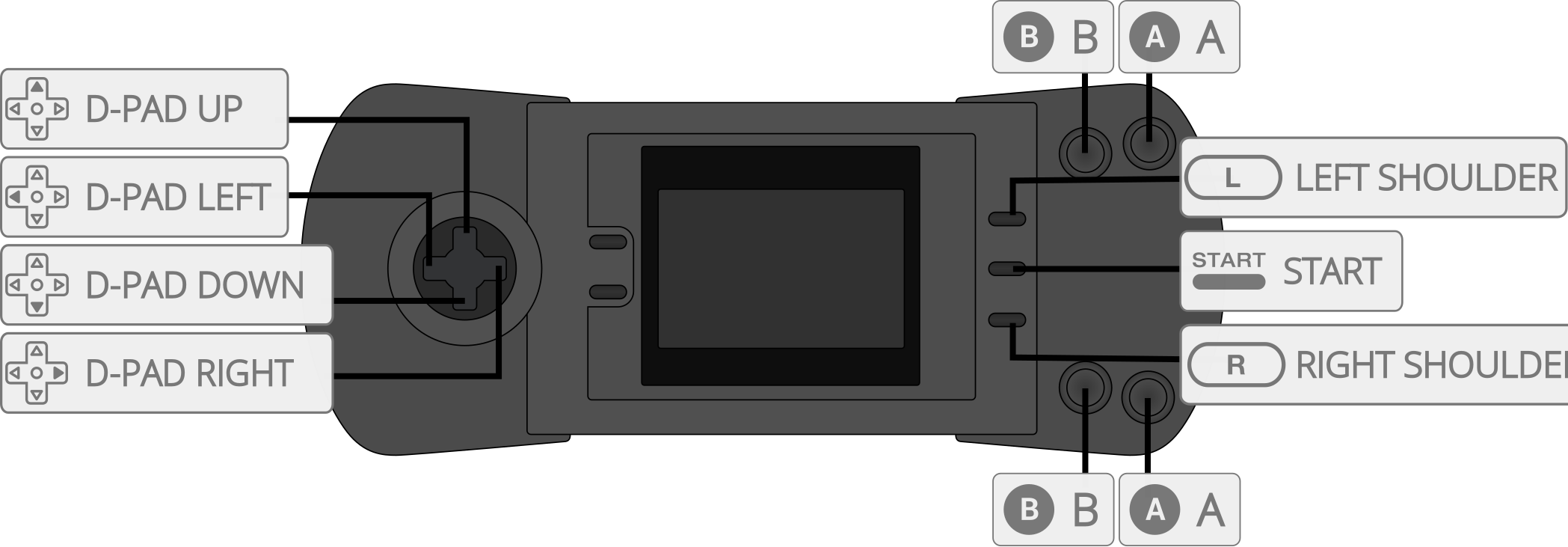
| User 1-4 input descriptors | RetroPad Inputs |
|---|---|
| B |  |
| Pause |  |
| Up |  |
| Down |  |
| Left |  |
| Right |  |
| A |  |
| Option 1 |  |
| Option 2 |  |
Compatibility
External Links
- Official Gearlynx Github Repository
- Libretro Gearlynx Core info file
- Report Libretro Gearlynx Core Issues Here