Atari - Lynx (Handy)
Background
Handy is an Atari Lynx video game system emulator that can be used as a libretro core. Handy was the original name of the Lynx project that was started at Epyx and then finished by Atari.
Author/License
The Handy core has been authored by
- K. Wilkins
The Handy core is licensed under
A summary of the licenses behind RetroArch and its cores can be found here.
Extensions
Content that can be loaded by the Handy core have the following file extensions:
- .lnx
Databases
RetroArch database(s) that are associated with the Handy core:
BIOS
Required or optional firmware files go in the frontend's system directory.
| Filename | Description | md5sum |
|---|---|---|
| lynxboot.img | Lynx Boot Image - Required | fcd403db69f54290b51035d82f835e7b |
Features
Frontend-level settings or features that the Handy core respects.
| Feature | Supported |
|---|---|
| Restart | ✔ |
| Screenshots | ✔ |
| Saves | ✕ |
| States | ✔ |
| Rewind | ✔ |
| Netplay (State based) | ✔ (not link-cable emulation) |
| Core Options | ✔ |
| Memory Monitoring (achievements) | ✔ |
| Cheats (Cheats menu) | ✕ |
| Native Cheats | ✕ |
| Controls | ✔ |
| Remapping | ✔ |
| Multi-Mouse | ✕ |
| Rumble | ✕ |
| Sensors | ✕ |
| Camera | ✕ |
| Location | ✕ |
| Subsystem | ✕ |
| Softpatching | ✕ |
| Disk Control | ✕ |
| Username | ✕ |
| Language | ✕ |
| Crop Overscan | ✕ |
| LEDs | ✕ |
Directories
The Handy core's directory name is 'Handy'
The Handy core saves/loads to/from these directories.
Frontend's State directory
- 'content-name'.state# (State)
Geometry and timing
- The Handy core's core provided FPS is 75
- The Handy core's core provided sample rate is 22050 Hz
- The Handy core's core provided aspect ratio is dependent on the 'Display rotation' core option. When set to None, the aspect ratio will be 80/51. When set to 90 or 240, the aspect ratio will be 51/80.
Core options
The Handy core has the following option(s) that can be tweaked from the core options menu. The default setting is bolded.
Settings with (Restart) means that core has to be closed for the new setting to be applied on next launch.
-
Video Refresh Rate [handy_refresh_rate] (50Hz|60Hz|75Hz|100Hz|120Hz)
Set video update frequency. Internally, the Lynx renders at a variable rate from 0 to 75Hz. Frames that occur between video update events will be dropped. Higher rates may increase video smoothness (depending on actual game frame rate) but can cause tearing on 60Hz displays.
-
Display Rotation [handy_rot] (Auto|Disabled|Clockwise|Bottom|Anticlockwise)
Rotate the virtual console screen to achieve the correct layout of 'portrait' oriented games on a conventional (landscape) display.
-
Color Depth (Restart Required) [handy_gfx_colors] (Thousands (16-bit)|Millions (24-bit))
Specify number of colors to display on-screen. 24-bit significantly increases performance overheads and is not available on all platforms.
-
LCD Ghosting Filter [handy_lcd_ghosting] (OFF|2 Frames|3 Frames|4 Frames)
Apply an image 'ghosting' effect by blending multiple successive video frames. Mimics the display characteristics of the Lynx's LCD panel and helps to smooth the appearance of low frame rate games. Higher frame counts improve the effect at the expense of increased performance overheads.
-
CPU Overclock Multiplier [handy_overclock] (1|2|3|4|5|6|7|8|9|10|20|30|40|50)
Higher values can reduce slowdowns in games. WARNING: Can cause glitches and crashes.
-
Frameskip [handy_frameskip] (OFF|Auto|Manual)
Skip frames to avoid audio buffer under-run (crackling). Improves performance at the expense of visual smoothness. 'Auto' skips frames when advised by the frontend. 'Manual' utilizes the 'Frameskip Threshold (%)' setting.
-
Frameskip Threshold (%) [handy_frameskip_threshold] (15|18|21|24|27|30|33|36|39|42|45|48|51|54|57|60)
When 'Frameskip' is set to 'Manual', specifies the audio buffer occupancy threshold (percentage) below which frames will be skipped. Higher values reduce the risk of crackling by causing frames to be dropped more frequently.
Controllers
The Handy core supports the following device type(s) in the controls menu, bolded device types are the default for the specified user(s):
User 1 device types
- None - Doesn't disable input.
- RetroPad - Joypad
- RetroPad w/Analog - Joypad - There's no reason to switch to this.
Controller tables
Joypad
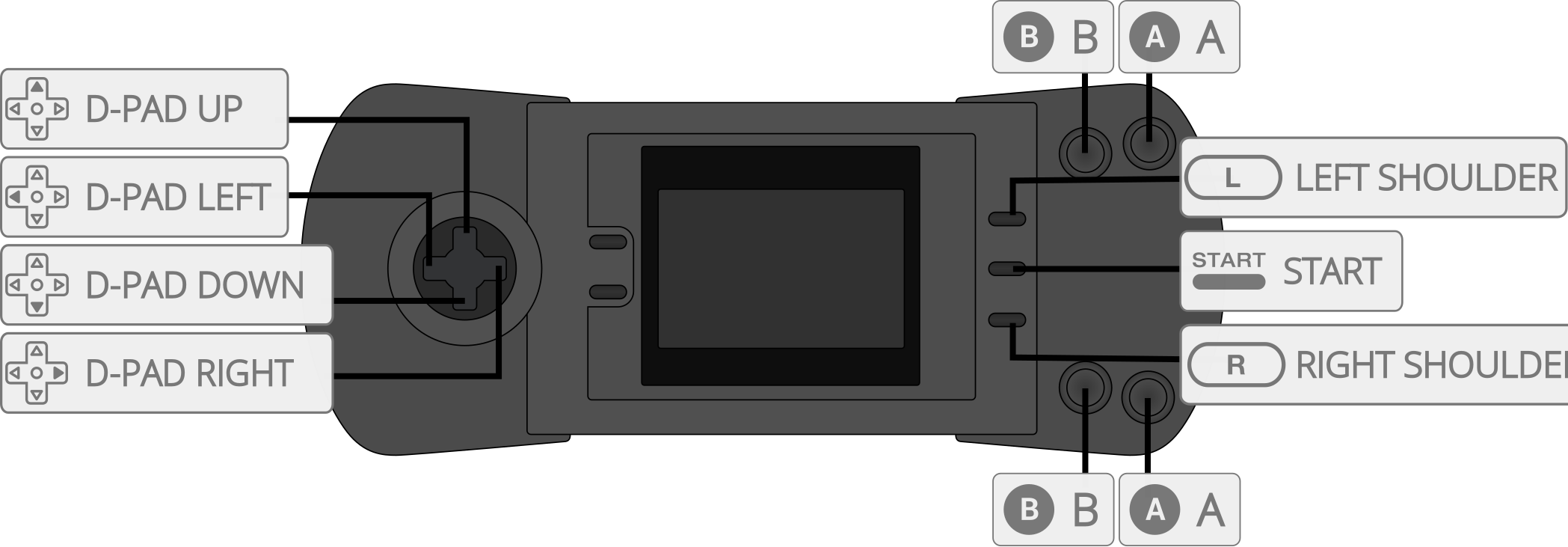
| User 1 Remap descriptors | RetroPad Inputs |
|---|---|
| B |  |
| Pause |  |
| D-Pad Up |  |
| D-Pad Down |  |
| D-Pad Left |  |
| D-Pad Right |  |
| A |  |
| Option 1 |  |
| Option 2 |  |
Supported combinations
- Option 1 + Pause = Restarts game
- Option 2 + Pause = Flips Screen
Compatibility
| Game | Issue |
|---|---|
| RoadBlasters | Graphics glitches. Minor flickering and glitches after starting a race. |
External Links
- Official Handy Website
- Official Handy Downloads
- Libretro Handy Core info file
- Libretro Handy Github Repository
- Report Libretro Handy Core Issues Here
- Gameplay Videos