Nintendo - SNES / Famicom (Beetle bsnes)
Background
Standalone port of Mednafen bSNES to libretro, itself a old fork of bsnes 0.59.
This core exists as a side effect of porting/forking mednafen for its other cores in the past. There's no reason to use this core now that there's other more compatible and faster SNES cores.
Author/License
The Beetle bsnes core has been authored by
- byuu
- Mednafen Team
The Beetle bsnes core is licensed under
A summary of the licenses behind RetroArch and its cores can be found here.
Extensions
Content that can be loaded by the Beetle bsnes core have the following file extensions:
- .smc
- .fig
- .bs
- .st
- .sfc
Databases
RetroArch database(s) that are associated with the Beetle bsnes core:
- Nintendo - Super Nintendo Entertainment System
- Nintendo - Super Nintendo Entertainment System Hacks
- Nintendo - Sufami Turbo
Features
Frontend-level settings or features that the Beetle bsnes core respects.
| Feature | Supported |
|---|---|
| Restart | ✔ |
| Screenshots | ✔ |
| Saves | ✔ |
| States | ✔ |
| Rewind | ✔ |
| Netplay | ✔ |
| Core Options | ✕ |
| Memory Monitoring (achievements) | ✕ |
| RetroArch Cheats | ✕ |
| Native Cheats | ✕ |
| Controls | ✔ |
| Remapping | ✕ |
| Multi-Mouse | ✕ |
| Rumble | ✕ |
| Sensors | ✕ |
| Camera | ✕ |
| Location | ✕ |
| Subsystem | ✕ |
| Softpatching | ✕ |
| Disk Control | ✕ |
| Username | ✕ |
| Language | ✕ |
| Crop Overscan | ✔ |
| LEDs | ✕ |
Directories
The Beetle bsnes core's internal core name is 'Mednafen bSNES'
The Beetle bsnes core saves/loads to/from these directories.
Frontend's Save directory
- 'content-name'.srm (Cartridge battery save)
- 'content-name'.rtc (Real time clock save)
Frontend's State directory
- 'content-name'.state# (State)
Geometry and timing
- The Beetle bsnes core's core provided FPS is 60.10
- The Beetle bsnes core's core provided sample rate is 44100 Hz
- The Beetle bsnes core's core provided aspect ratio is 4/3
Controllers
The Beetle bsnes core supports the following device type(s) in the controls menu, bolded device types are the default for the specified user(s):
User 1 - 2 device types
- None - Doesn't disable input
- RetroPad - Joypad
- RetroPad w/Analog - Joypad - There's no reason to switch to this.
Controller tables
Joypad
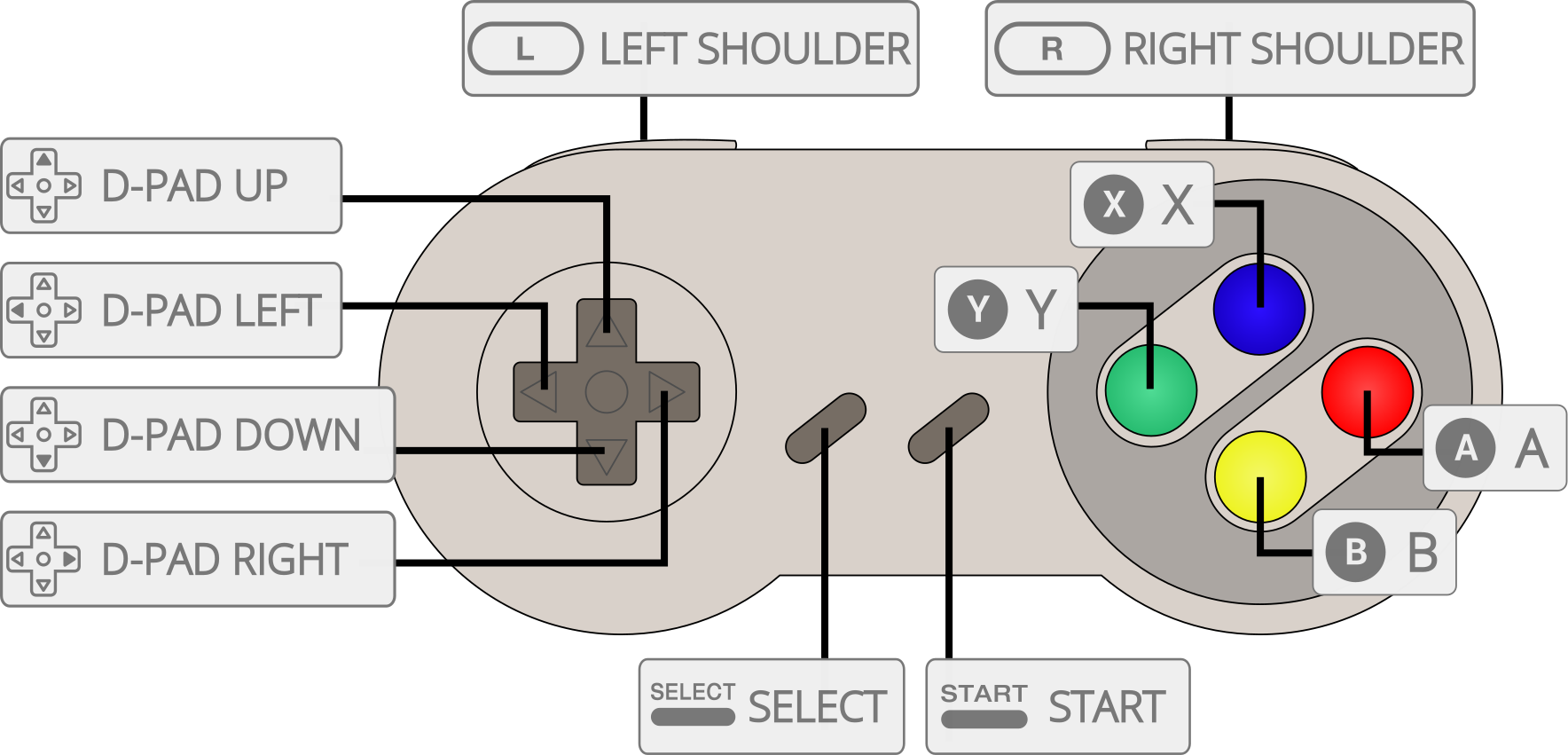
| RetroPad Inputs | Beetle bsnes Inputs |
|---|---|
 |
B |
 |
Y |
 |
Select |
 |
Start |
 |
D-Pad Up |
 |
D-Pad Down |
 |
D-Pad Left |
 |
D-Pad Right |
 |
A |
 |
X |
 |
L |
 |
R |
External Links
- Official Mednafen Website
- Official Mednafen Downloads
- Libretro Beetle bsnes Core info file
- Libretro Beetle bsnes Github Repository
- Report Libretro Beetle bsnes Core Issues Here
See also
Nintendo - Sufami Turbo
- Nintendo - SNES / Famicom (bsnes-jg)
- Nintendo - SNES / Famicom (bsnes-mercury Accuracy)
- Nintendo - SNES / Famicom (bsnes-mercury Balanced)
- Nintendo - SNES / Famicom (bsnes-mercury Performance)
- Nintendo - SNES / Famicom (bsnes Accuracy)
- Nintendo - SNES / Famicom (bsnes Balanced)
- Nintendo - SNES / Famicom (bsnes C++98 (v085))
- Nintendo - SNES / Famicom (bsnes Performance)
- Nintendo - SNES / Famicom (Snes9x)
- Nintendo - SNES / Famicom (Snes9x 2002)
- Nintendo - SNES / Famicom (Snes9x 2005 Plus)
- Nintendo - SNES / Famicom (Snes9x 2005)
- Nintendo - SNES / Famicom (Snes9x 2010)
Nintendo - Super Nintendo Entertainment System (+Hacks)
- Nintendo - SNES / Famicom (bsnes-jg)
- Nintendo - SNES / Famicom (bsnes-mercury Accuracy)
- Nintendo - SNES / Famicom (bsnes-mercury Balanced)
- Nintendo - SNES / Famicom (bsnes-mercury Performance)
- Nintendo - SNES / Famicom (bsnes Accuracy)
- Nintendo - SNES / Famicom (bsnes Balanced)
- Nintendo - SNES / Famicom (bsnes C++98 (v085))
- Nintendo - SNES / Famicom (bsnes Performance)
- Nintendo - SNES / Famicom (higan Accuracy)
- Nintendo - SNES / Famicom (nSide Balanced)
- Nintendo - SNES / Famicom (Mesen-S)
- Nintendo - SNES / Famicom (Snes9x)
- Nintendo - SNES / Famicom (Snes9x 2002)
- Nintendo - SNES / Famicom (Snes9x 2005 Plus)
- Nintendo - SNES / Famicom (Snes9x 2005)
- Nintendo - SNES / Famicom (Snes9x 2010)