Atari - Lynx (Gearlynx)
Background
Gearlynx is an open source, cross-platform, Atari Lynx emulator written in C++.
- Very accurate emulation supporting the entire commercial Atari Lynx catalog.
- Bank switching (BANK1 + AUDIN) and EEPROM support.
- Save files (EEPROM and NVRAM).
- Configurable low-pass audio filter.
- Internal database for automatic rom detection and hardware selection if
Autooptions are selected. - Supported platforms (libretro): Windows, Linux, macOS, Raspberry Pi, Android, iOS, tvOS, PlayStation Vita, PlayStation 3, Nintendo 3DS, Nintendo GameCube, Nintendo Wii, Nintendo WiiU, Nintendo Switch, Emscripten, Classic Mini systems (NES, SNES, C64, ...), OpenDingux, RetroFW and QNX.
The Gearlynx core has been authored by:
The Gearlynx core is licensed under:
A summary of the licenses behind RetroArch and its cores can be found here.
BIOS
Gearlynx requires a BIOS to work.
Required firmware files go in the frontend's system directory.
Attention
The Lynx boot ROM file is required for Gearlynx to function.
| Filename | Description | md5sum |
|---|---|---|
| lynxboot.img | Lynx Boot Image - Required | fcd403db69f54290b51035d82f835e7b |
Extensions
Content that can be loaded by the Gearlynx core have the following file extensions:
- .lnx
- .lyx
- .o
RetroArch database(s) that are associated with the Gearlynx core:
Features
Frontend-level settings or features that the Gearlynx core respects.
| Feature | Supported |
|---|---|
| Restart | ✔ |
| Screenshots | ✔ |
| Saves | ✔ |
| States | ✔ |
| Rewind | ✔ |
| Netplay | ✔ |
| Core Options | ✔ |
| Memory Monitoring (achievements) | ✔ |
| RetroArch Cheats | ✕ |
| Native Cheats | ✕ |
| Controls | ✔ |
| Remapping | ✔ |
| Multi-Mouse | ✕ |
| Rumble | ✕ |
| Sensors | ✕ |
| Camera | ✕ |
| Location | ✕ |
| Subsystem | ✕ |
| Softpatching | ✔ |
| Disk Control | ✕ |
| Username | ✕ |
| Language | ✕ |
| Crop Overscan | ✕ |
| LEDs | ✕ |
Directories
The Gearlynx core's library name is 'Gearlynx'
The Gearlynx core saves/loads to/from these directories.
Frontend's Save directory
| File | Description |
|---|---|
| *.srm | EEPROM / NVRAM save |
Frontend's State directory
| File | Description |
|---|---|
| *.state# | State |
Geometry and timing
- The Gearlynx core's core provided FPS is variable from 50 to 75
- The Gearlynx core's core provided sample rate is 44100 Hz
- The Gearlynx core's base width is 160
- The Gearlynx core's base height is 102
- The Gearlynx core's max width is 160
- The Gearlynx core's max height is 102
- The Gearlynx core's provided aspect ratio is dependent on the 'Aspect Ratio' core option.
Core options
The Gearlynx core has the following options that can be tweaked from the core options menu. The default setting is bolded.
Settings with (restart) means that core has to be closed for the new setting to be applied on next launch.
-
Aspect Ratio [gearlynx_aspect_ratio] (1:1 PAR|4:3 DAR|16:9 DAR|16:10 DAR)
Select which aspect ratio will be presented by the core.
- 1:1 PAR selects an aspect ratio that produces square pixels.
- 4:3 DAR forces 4:3 aspect ratio.
- 16:9 DAR forces 16:9 aspect ratio.
- 16:10 DAR forces 16:10 aspect ratio.
-
Screen Rotation [gearlynx_rotation] (Auto|Left|Right|Disabled)
Rotates the screen display. This is useful since many Lynx games were designed to be played with the system held vertically.
- Auto automatically rotates based on the game.
- Left rotates the screen 90 degrees counter-clockwise.
- Right rotates the screen 90 degrees clockwise.
- Disabled forces the screen to remain in standard horizontal orientation.
-
Console Type [gearlynx_console_type] (Auto|Lynx I|Lynx II)
Select the Atari Lynx console model to emulate.
- Auto automatically selects the appropriate console type based on the game.
- Lynx I forces emulation of the original Lynx model.
- Lynx II forces emulation of the Lynx II model.
-
Audio Low-Pass Filter (Hz) [gearlynx_lowpass_filter] (3500|500|1000|1500|2000|2500|3000|3500|4000|4500|5000)
Configures a low-pass audio filter to reduce high-frequency noise.
-
Audio Channel 0 Volume [gearlynx_audio_ch0_volume] (100|0-200)
Sets the volume level for audio channel 0 (percentage).
-
Audio Channel 1 Volume [gearlynx_audio_ch1_volume] (100|0-200)
Sets the volume level for audio channel 1 (percentage).
-
Audio Channel 2 Volume [gearlynx_audio_ch2_volume] (100|0-200)
Sets the volume level for audio channel 2 (percentage).
-
Audio Channel 3 Volume [gearlynx_audio_ch3_volume] (100|0-200)
Sets the volume level for audio channel 3 (percentage).
-
Allow Up+Down / Left+Right [gearlynx_up_down_allowed] (Disabled|Enabled)
Enabling this option allows pressing, quickly alternating, or holding both left and right (or up and down) directions at the same time.
This may cause movement based glitches to occur in certain games.
It's best to keep this core option disabled.
Joypad
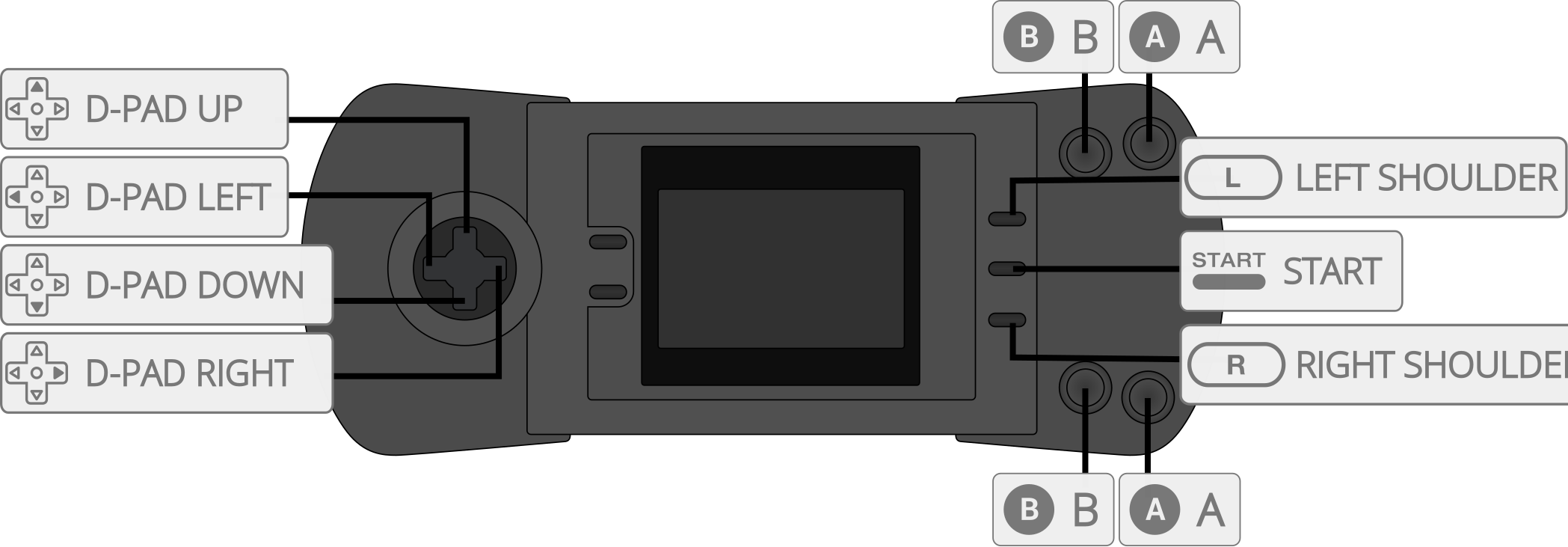
| User 1 input descriptors | RetroPad Inputs |
|---|---|
| B |  |
| Pause |  |
| Up |  |
| Down |  |
| Left |  |
| Right |  |
| A |  |
| Option 1 |  |
| Option 2 |  |
Compatibility
External Links
- Official Gearlynx Github Repository
- Libretro Gearlynx Core info file
- Report Libretro Gearlynx Core Issues Here